
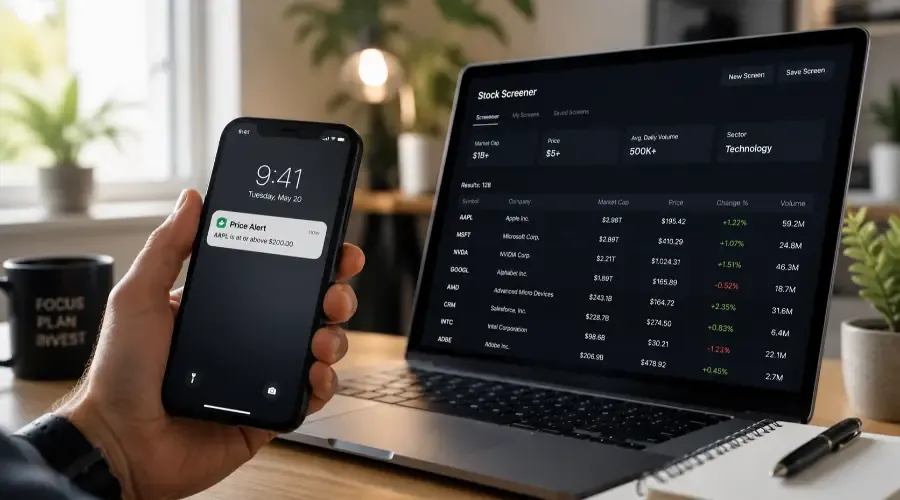
An approved, funded account gives you access. Knowing how to use it efficiently is a separate step that most investors skip – and then wonder why the platform feels overwhelming. Thirty minutes of intentional configuration at the start changes the experience from cluttered to workable.
| Platform Tool | Core Functionality | The "Pro Tip" Highlighted |
|---|---|---|
| Watchlists | Custom, unowned ticker queues | Segment by themes (Tech, Consumer, ETFs) |
| Screeners | Filters 5,000+ stocks down to a shortlist | Use hard boundaries ($1B+ cap, $5+ price) |
| Price Alerts | Triggers notifications at exact levels | Replaces the anxiety of constant manual price checking |
| Mobile Apps | On-the-go portfolio monitoring | Enable biometric login, but mute generic news feeds |
| Demo Accounts | Risk-free execution simulation | Use it to master order mechanics, not emotional discipline |
Navigating Your Platform for the First Time
Most brokerage platforms share the same core structure regardless of interface design: a portfolio view showing what you own, a trading interface for placing orders, a quotes and research section for looking up securities, and an account management area for transfers, statements, and settings.
The instinct when first logging in is to look for something to buy. The more productive first session: locate the trading interface and practice navigating it without placing an order. Find where order confirmations appear. Locate account history. Find the settings panel. Understanding the layout before you need it under any time pressure removes the anxiety of figuring it out while you're trying to act on a decision.
Most platforms offer a tour or onboarding sequence on first login. Going through it – even if it feels basic – maps the interface faster than clicking randomly.
Building Watchlists
A watchlist is a custom list of tickers you're monitoring without owning. It's the most immediately practical tool in any brokerage platform – your research queue organized in one place.
The most effective approach is categorization rather than a single undifferentiated list. Examples: a Tech list for technology companies you're evaluating, a Consumer Brands list for businesses whose products you use and want to understand as investments, an ETFs list for index funds you're considering, and a Learning list for stocks mentioned in news or research that you want to look into when you have time.
What to track for each ticker: current price, percentage change today, market cap, and one-line note on why it's on the list. Most platforms let you add notes or tags to watchlist entries. Using this feature prevents the watchlist from becoming a graveyard of tickers you added and can no longer remember why.
Watchlists work as pre-investment research queues. The discipline is adding tickers when you hear about them, researching before you buy, and removing tickers once you've made a decision – whether to invest or pass.
Using Stock Screeners
A stock screener filters the 5,000-plus U.S. listed securities down to a manageable list matching your criteria. It answers the question "which companies should I be looking at?" without requiring you to scroll through thousands of tickers.
Basic beginner-useful filters:
Market cap: Setting a minimum of $1 billion excludes micro-cap and penny stocks with the highest volatility and liquidity risk. Setting minimum $10 billion filters to large-cap stability.
Price: Setting a price floor eliminates sub-$5 stocks, which disproportionately include distressed companies and OTC-listed securities with limited investor protections.
Average daily volume: Requiring minimum 500,000 shares daily ensures adequate liquidity – you can enter and exit without meaningfully moving the price or paying wide spreads.
Sector: Filtering by sector allows you to start with industries you understand. Investing in businesses whose products and economics you already know reduces the research burden and increases the quality of your analysis.
| Filter | Suggested Threshold | What It Achieves |
|---|---|---|
| Market Cap | ≥ $1 billion | Excludes micro-caps, penny stocks, extreme volatility |
| Price | ≥ $5 | Filters out distressed names and OTC-listed securities |
| Avg. Daily Volume | ≥ 500,000 shares | Ensures adequate liquidity and narrow bid-ask spreads |
| Sector | Pick known industries | Reduces research burden, improves analysis quality |
Free screeners available without any account: Finviz (finviz.com), Yahoo Finance Screener, and most major brokerage platforms include screening tools in their research sections.
Screeners generate ideas, not buy signals. Every company a screener surfaces requires actual research before any investment decision.
Setting Up Price Alerts
A price alert notifies you when a stock reaches a level you specify. It replaces the habit of checking prices repeatedly – which serves no useful function and generates anxiety – with a targeted notification that only fires when something you've defined as relevant actually happens.
Types of alerts worth setting:
Price target alerts: set a buy alert at the price you'd find a stock attractive. If the stock never reaches it, you never think about it again until it does.
Earnings date alerts: most platforms let you set reminders for earnings announcement dates so you're aware before the event rather than surprised by it.
Significant move alerts: a percentage-move alert (e.g., "notify me if this stock moves more than 5% in a day") flags unusual activity worth investigating.
Where to set them: Brokerage apps allow alerts directly on any stock quote page. Yahoo Finance and Google Finance both support free price alerts without a brokerage account. Setting alerts in multiple places (broker app and a financial platform) adds redundancy if you're counting on not missing something.
The discipline of setting alerts before you want them – when researching a company, not when reacting to a price move – is what makes them useful rather than reactive.
Mobile Trading Apps
The mobile app is the version of your brokerage account you'll use most often. Configuring it well at the start makes it an asset rather than a distraction.
Essential setup steps:
Enable biometric login (fingerprint or Face ID). The friction of typing a password every time you check your account is a small but real deterrent to regular monitoring. Biometric login removes it.
Enable push notifications for order fills and price alerts. Disable general market news notifications unless you've made a specific decision that daily market news is useful to your investing process. For most investors, it isn't.
Configure 2FA (two-factor authentication) for mobile login. Some platforms allow biometric login without 2FA for speed – a convenience trade-off that's worth understanding before accepting.
Review what the app does and doesn't do versus the desktop platform. Some research tools and account management functions are desktop-only at certain brokers. Knowing the gap prevents surprises when you need something the app doesn't offer.
Mobile trading considerations: Mobile apps make trading easy. That ease is occasionally a liability. A properly structured portfolio doesn't require daily action. The mobile app is most useful for monitoring, setting alerts, and reviewing positions – not for the reactive impulse to trade based on whatever price you just saw.
Demo Accounts and Practice Trading
Most major platforms and several independent services offer paper trading – a practice environment using virtual money that operates identically to real trading but with no financial consequence for errors.
Paper trading accomplishes several things that reading about trading does not:
It forces you to practice the mechanics of order placement – specifying quantity, choosing order type, setting limit prices – in real time without the anxiety of committing actual capital.
It exposes platform-specific quirks. The way a limit order is configured on Fidelity differs from Schwab. Working through that in a practice environment is faster than learning it during an actual trade.
It builds familiarity with how positions update, how order confirmations look, and where to find trade history – all of which reduce cognitive load when you're using real money.
What paper trading doesn't replicate: emotional response. The discipline of holding a position through a 10% decline feels different when it's real money. Paper trading builds mechanical skill; it doesn't build behavioral skill under pressure. Treat it as the mechanical foundation – the prerequisite, not the complete preparation.
Platforms with paper trading available: Schwab's thinkorswim platform, Webull, TradeStation. Some platforms call it "virtual trading" or "simulated trading."
This content is for educational purposes only and does not constitute investment, legal, or tax advice. Investing in securities involves risk, including possible loss of principal. Always conduct your own research and consult a licensed financial professional before making investment decisions.